Tumblr-Videos online herunterladen
Sie haben ein Video in einem Tumblr-Beitrag gefunden und möchten es für später speichern? MediaPuller verarbeitet Links zu öffentlich zugänglichen Tumblr-Beiträgen und zeigt die verfügbaren Videodateien an, wenn sie abgerufen werden können.
Kopieren Sie nicht die Startseite eines Blogs oder einen Link aus dem Tumblr-Dashboard, sondern öffnen Sie zuerst den einzelnen Beitrag, der das Video enthält. Fügen Sie dessen Permalink in MediaPuller ein, klicken Sie auf Gehen und prüfen Sie die für diesen Beitrag gefundenen Medienoptionen.
Ein Video aus einem einzelnen Tumblr-Beitrag herunterladen
Videos auf Tumblr werden normalerweise als Teil eines Beitrags veröffentlicht. Ein Beitrag kann Text, Bilder, GIFs, Bildunterschriften, Tags, Reblogs oder einen eingebetteten Player enthalten, sodass sich auf der Seite deutlich mehr als nur eine Videodatei befinden kann.
MediaPuller arbeitet mit der von Ihnen übermittelten URL. Deshalb ist der Permalink des genauen Tumblr-Beitrags, in dem das Video erscheint, normalerweise die beste Wahl. Eine allgemeine Blogadresse gibt nicht an, welcher Beitrag oder welches Medienelement verarbeitet werden soll.
So finden Sie den richtigen Tumblr-Videolink
Der im Browser sichtbare Link ist nicht immer der beste Link zum Kopieren. Wenn Sie einen Feed, eine Suchseite, ein Archiv oder eine Beitragsliste durchsuchen, öffnen Sie den gewünschten Beitrag zunächst auf seiner eigenen Seite.
Schritt 1. Suchen Sie den Tumblr-Beitrag mit dem Video, das Sie speichern möchten.
Öffnen Sie den Beitrag selbst, anstatt auf der Blog-Startseite, im Archiv, auf einer Tag-Seite oder in einem fortlaufenden Feed zu bleiben.
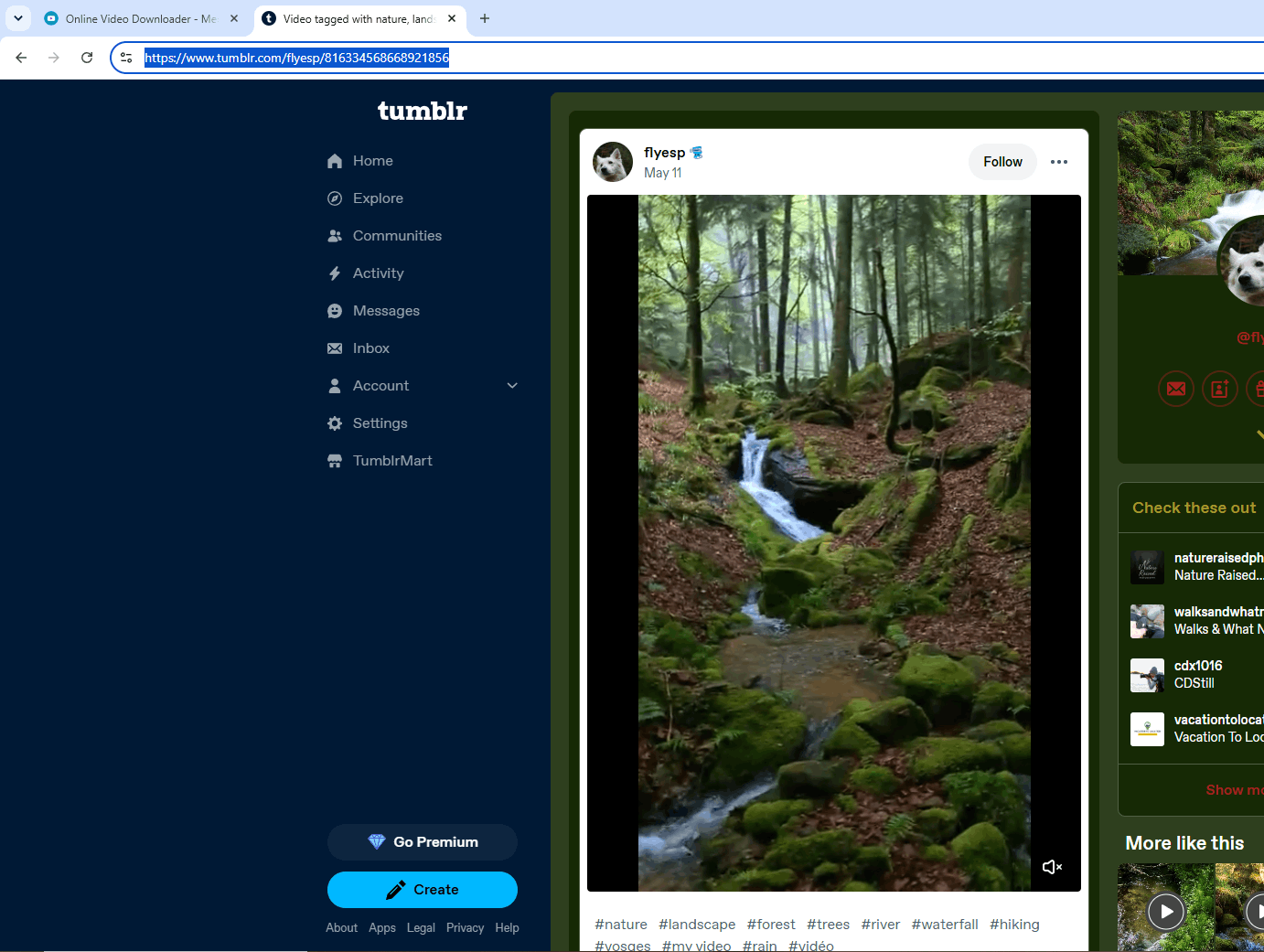
Schritt 2. Verwenden Sie den Beitragslink oder die Teilen-Funktion, um die permanente Seite des Beitrags zu öffnen.
Dadurch kann MediaPuller einen bestimmten Tumblr-Beitrag analysieren, anstatt einen ganzen Blog zu verarbeiten.
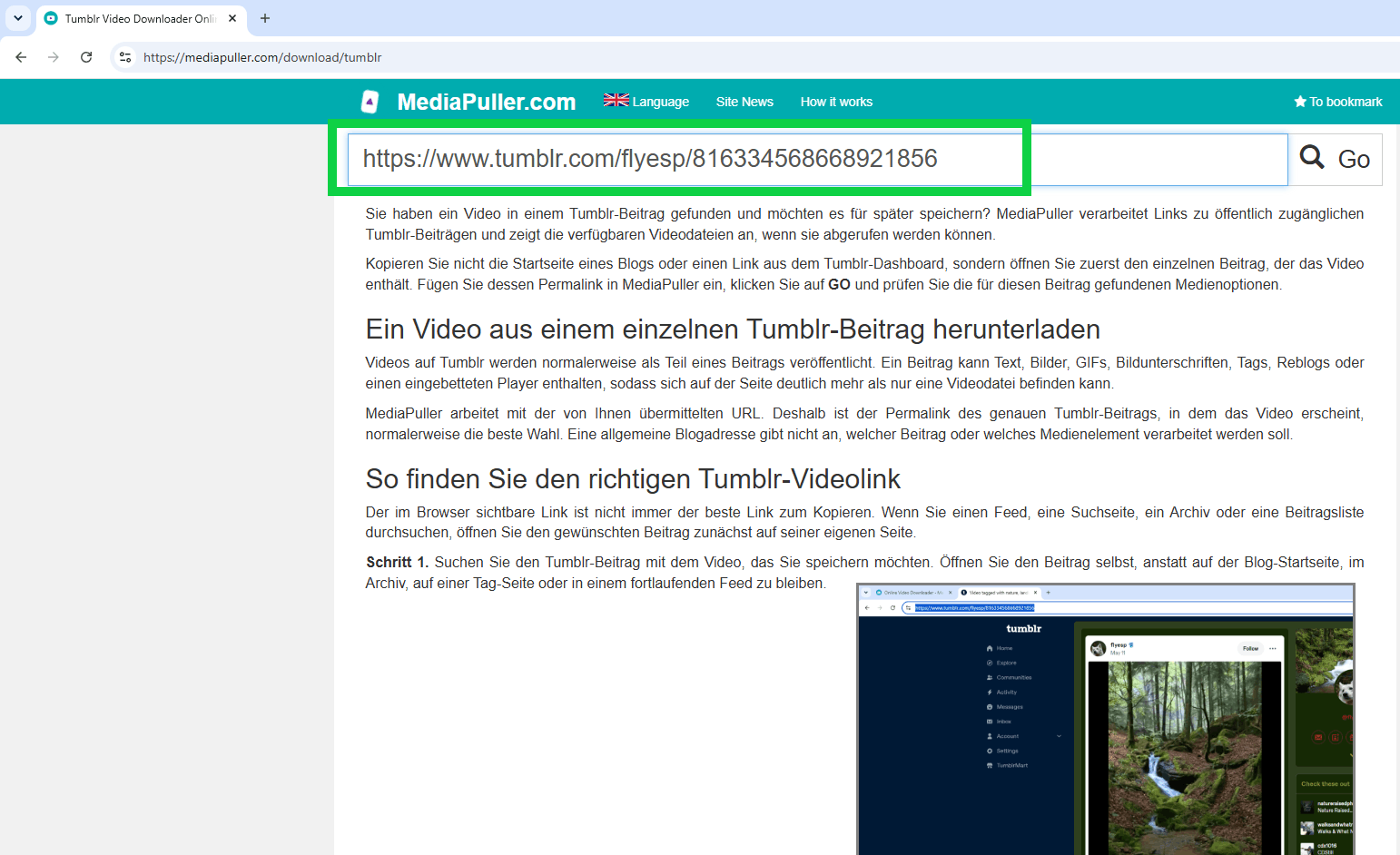
Schritt 3. Kopieren Sie die vollständige URL des Beitrags und fügen Sie sie in das Eingabefeld von MediaPuller ein. Klicken Sie auf Gehen, um mit der Verarbeitung des übermittelten Tumblr-Links zu beginnen.
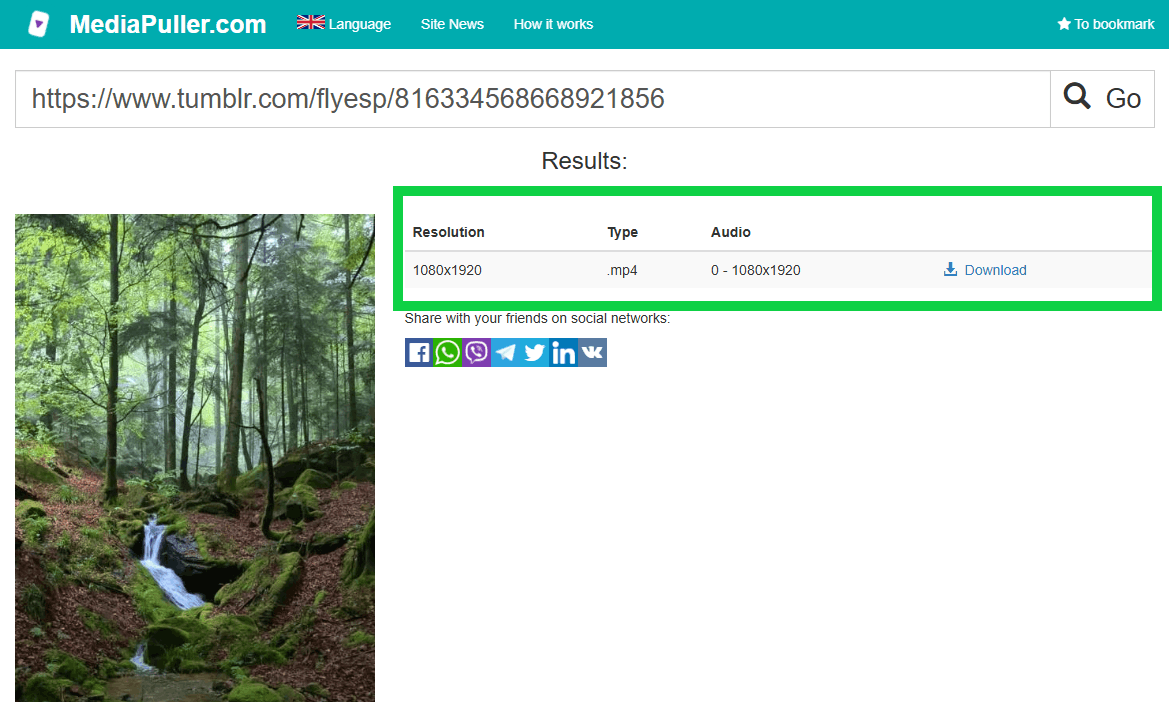
Schritt 4. Warten Sie, während MediaPuller die mit dem Beitrag verbundenen Mediendateien überprüft.
Wenn ein herunterladbares Video abgerufen werden kann, erscheint das verfügbare Ergebnis unter dem Eingabefeld.
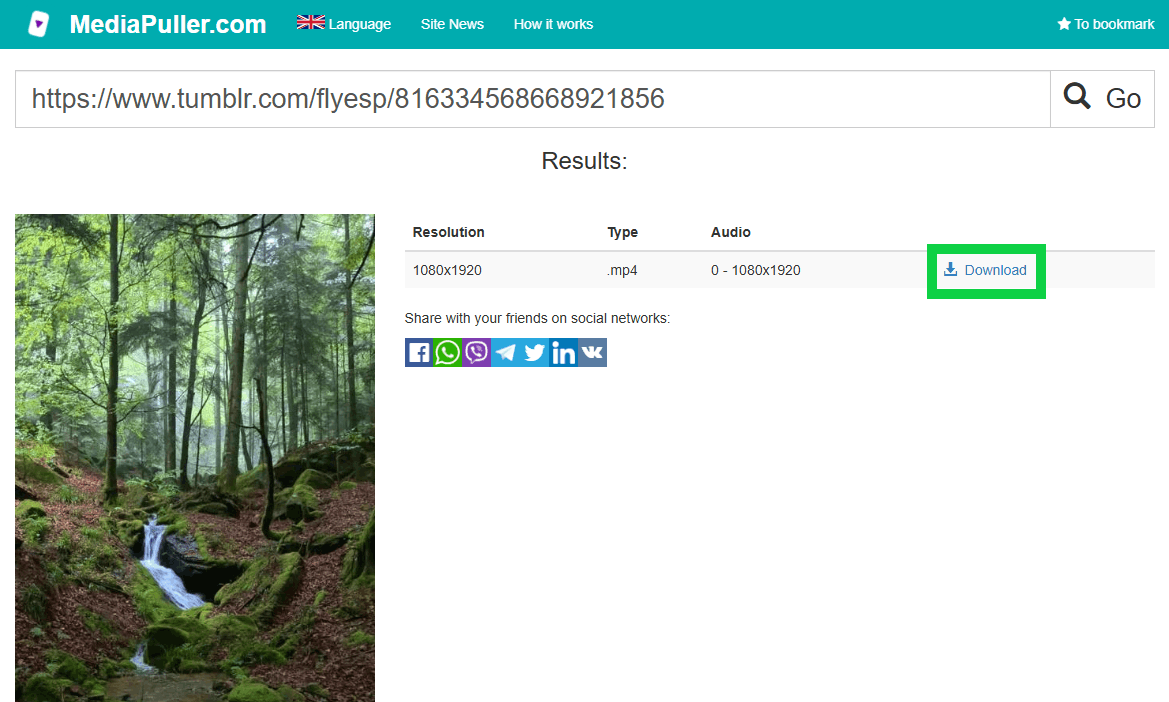
Schritt 5. Wählen Sie die gefundene Videooption aus und speichern Sie die Datei über Ihren Browser.
Das genaue Ergebnis hängt von den Medien ab, die mit dem ursprünglichen Tumblr-Beitrag verbunden sind.
Tumblr-Beiträge, Reblogs und Originalquellen
Tumblr ermöglicht es, Beiträge über Reblogs weiterzuverbreiten. Ein Reblog kann Kommentare oder zusätzliche Inhalte enthalten und sich trotzdem auf Medien beziehen, die ursprünglich in einem früheren Beitrag veröffentlicht wurden.
Wenn ein Reblog-Link nicht das erwartete Video liefert, suchen Sie nach dem Originalbeitrag oder dem Quellenlink und übermitteln Sie stattdessen diese URL. Die ursprüngliche Veröffentlichung kann eine direktere Verbindung zur Videodatei besitzen als ein späterer Reblog mit einer langen Verlaufskette.
Hochgeladene Videos und eingebettete Player
Nicht jedes auf Tumblr sichtbare Video wird zwangsläufig als Tumblr-Videodatei gespeichert. Ein Beitrag kann auch einen Player oder Medien enthalten, die von einer anderen Website eingebettet wurden.
Wenn das Video zu einer externen Plattform gehört, liefert der Link zum Tumblr-Beitrag möglicherweise kein herunterladbares Tumblr-Ergebnis. Öffnen Sie das eingebettete Video in diesem Fall auf der ursprünglichen Website und verwenden Sie die für diese Quelle vorgesehene Downloader-Seite, sofern MediaPuller sie unterstützt.
Warum die URL eines Tumblr-Blogs normalerweise nicht ausreicht
Ein Tumblr-Blog kann Hunderte oder Tausende einzelner Beiträge enthalten. Wenn Sie nur die Startseite des Blogs übermitteln, kann der Downloader nicht erkennen, in welchem Beitrag sich das gewünschte Video befindet.
Dasselbe gilt für Tag-Seiten, Archivseiten, Suchergebnisse und Links aus dem Dashboard. Diese Seiten können mehrere Beiträge gleichzeitig anzeigen und sich ändern, wenn neue Inhalte hinzukommen. Ein direkter Permalink zu einem Beitrag ist eine wesentlich präzisere Eingabe.
Was passiert, wenn ein Beitrag mehrere Medienelemente enthält?
Einige Tumblr-Beiträge enthalten mehr als ein Bild, eine Animation oder ein Videoelement. MediaPuller überprüft den übermittelten Beitrag und zeigt die Videooptionen an, die abgerufen werden können.
Prüfen Sie das Ergebnis, bevor Sie die Datei speichern. Wenn mehrere Optionen zurückgegeben werden, können Sie den Titel, die Vorschau, das Format oder andere sichtbare Informationen verwenden, um die Datei auszuwählen, die dem auf Tumblr geöffneten Video entspricht.
Tumblr-Videos auf Mobilgeräten speichern
Dasselbe beitragsbasierte Verfahren kann auch in einem mobilen Browser verwendet werden. Öffnen Sie den Tumblr-Beitrag, kopieren Sie dessen direkten Link, wechseln Sie zu MediaPuller und fügen Sie die URL in den Downloader ein.
Browser auf Android und iPhone können Mediendateien unterschiedlich behandeln. Ein Browser kann das Video sofort speichern, während ein anderer es in einem neuen Tab oder in einem integrierten Player öffnet. Verwenden Sie in diesem Fall die Download-Funktion des Browsers, das Teilen-Menü oder die auf Ihrem Gerät verfügbare Speicheroption.
Häufige Gründe, warum ein Tumblr-Video nicht abgerufen werden kann
Ein Tumblr-Beitrag liefert möglicherweise kein Videoergebnis, wenn der übermittelte Link auf eine Blogseite statt auf einen einzelnen Beitrag verweist, die Veröffentlichung nicht verfügbar ist, das Medium extern eingebettet wurde oder die Seite nicht öffentlich zugänglich ist.
Prüfen Sie zunächst, ob der Link den genauen Beitrag in einem normalen Browser-Tab öffnet. Handelt es sich um einen Reblog, versuchen Sie es mit der Originalquelle. Enthält der Beitrag einen externen Player, öffnen Sie diesen auf der Quellwebsite und verwenden Sie den passenden Downloader.
Bevor Sie Inhalte von Tumblr speichern
Speichern oder verwenden Sie Medien nur dann erneut, wenn Sie die entsprechende Erlaubnis oder eine andere rechtmäßige Grundlage dafür besitzen. Ein öffentlich sichtbarer Beitrag bedeutet nicht automatisch, dass die Rechte der Person entfallen, die das Video erstellt oder veröffentlicht hat.
Respektieren Sie den Urheber, den Rechteinhaber, den Betreiber des Tumblr-Blogs und alle Regeln, die für das ursprüngliche Medium gelten. MediaPuller verarbeitet übermittelte Links, überträgt jedoch keine Rechte an heruntergeladenen Inhalten.
FAQ zum Tumblr Video Downloader
Welche Tumblr-URL sollte ich übermitteln?
Verwenden Sie den direkten Permalink des einzelnen Tumblr-Beitrags, der das Video enthält. Vermeiden Sie Blog-Startseiten, Archive, Tag-Seiten, Suchseiten oder allgemeine Dashboard-Links.
Kann ich ein Video aus einem Tumblr-Reblog herunterladen?
Ein Reblog kann funktionieren, wenn das Video aus diesem Beitrag abgerufen werden kann. Falls nicht, öffnen Sie die ursprüngliche Veröffentlichung oder den Quellbeitrag und übermitteln Sie stattdessen dessen direkte URL.
Warum liefert ein Link zu einem Tumblr-Blog kein Video?
Eine Blog-URL kann viele unterschiedliche Beiträge enthalten und verweist nicht auf ein bestimmtes Video. Öffnen Sie den genauen Beitrag mit dem Medium und kopieren Sie dessen Permalink.
Kann MediaPuller extern eingebettete Tumblr-Videos herunterladen?
Ein in Tumblr eingebettetes Video kann zu einer anderen Plattform gehören. Wenn der Tumblr-Beitrag kein Ergebnis liefert, öffnen Sie das Video auf der ursprünglichen Website und verwenden Sie den für diese Quelle vorgesehenen Downloader.
Kann ein Tumblr-Beitrag mehrere herunterladbare Videos enthalten?
Ein Beitrag kann mehrere Medienelemente enthalten. MediaPuller zeigt die Videooptionen an, die aus dem übermittelten Beitrag abgerufen werden können. Prüfen Sie deshalb die Ergebnisse, bevor Sie eine Datei auswählen.
Warum liefert ein Bild- oder GIF-Beitrag kein Videoergebnis?
Der Beitrag enthält möglicherweise keine unterstützte Videodatei. Bilder, animierte Bilder, GIFs und Videodateien sind unterschiedliche Medientypen und können daher unterschiedliche Download-Optionen liefern.
Kann ich einen aus dem Dashboard kopierten Tumblr-Link verwenden?
Öffnen Sie den Beitrag vor dem Kopieren des Links auf seiner eigenen Seite. Eine Feed- oder Dashboard-URL ist möglicherweise kein stabiler Permalink zur ausgewählten Veröffentlichung.
Kann ich Tumblr-Videos auf Android oder iPhone speichern?
Sie können den Link zu einem öffentlichen Tumblr-Beitrag über einen mobilen Browser verarbeiten. Der abschließende Speichervorgang hängt von Ihrem Browser, dem Betriebssystem und der für den Beitrag gefundenen Medienoption ab.
Warum öffnet sich das Video in einem neuen Tab?
Einige Browser öffnen Videodateien in ihrem integrierten Mediaplayer, anstatt sie sofort zu speichern. Verwenden Sie die sichtbare Download-Schaltfläche, das Browsermenü oder die Speicheroption, um die Datei auf Ihrem Gerät zu speichern.
Verändert MediaPuller den ursprünglichen Tumblr-Beitrag?
Nein. MediaPuller bearbeitet, entfernt, rebloggt oder verändert die ursprüngliche Tumblr-Veröffentlichung nicht. Der Dienst verarbeitet lediglich die von Ihnen übermittelte URL und zeigt verfügbare Medienoptionen an, wenn diese abgerufen werden können.
Videos von anderen Websites herunterladen
Das Video in einem Tumblr-Beitrag kann von einer anderen unterstützten Plattform stammen. Sie können auch eines der folgenden MediaPuller-Download-Tools verwenden: Instagram-Downloader , YouTube-Downloader , Vimeo-Downloader , Facebook-Downloader , DailyMotion-Downloader , Aparat-Downloader , ccMixter-Downloader , TikTok-Downloader , Coub-Downloader , x.com-Downloader , Threads-Downloader , Reddit-Downloader , Pinterest-Downloader , SoundCloud-Downloader , Twitch-Downloader , Spotify-Downloader , Rumble-Downloader , Niconico-Downloader , Snapchat-Downloader , Bluesky-Downloader , Kwai-Downloader , Flickr-Downloader , LinkedIn-Downloader , VK-Downloader , OK.ru-Downloader , Xiaohongshu-Downloader und Archive.org-Downloader