Download ccMixter Music Online
MediaPuller helps you process available ccMixter.org links and save downloadable media files directly through your browser. Paste a ccMixter track or remix page URL, click Go, and check the file options returned for that specific page.
ccMixter is different from regular video platforms because its content is centered around music, remixes, samples, and creator-uploaded audio. This page is built for users who want a simple way to access available ccMixter downloads while paying attention to licenses, attribution, and original creator information.
Download Available Music from ccMixter.org
ccMixter links often point to audio-focused pages rather than standard video posts. That means the best result usually comes from using a direct page for a specific track, remix, sample, or upload instead of a search page, tag page, artist profile, or general category page.
MediaPuller checks the submitted ccMixter URL and displays available file options when they can be retrieved. The exact result depends on the page structure, the uploaded media, and whether downloadable files are available for that item.
How to Use the ccMixter Downloader
The process is simple, but the link type matters. Start from the exact ccMixter page that contains the audio or media item you want to save.
Step 1. Open ccMixter.org and find the track, remix, sample, or upload page you want to download.
Avoid copying only search pages, tag pages, or user profile pages if you need one specific file.
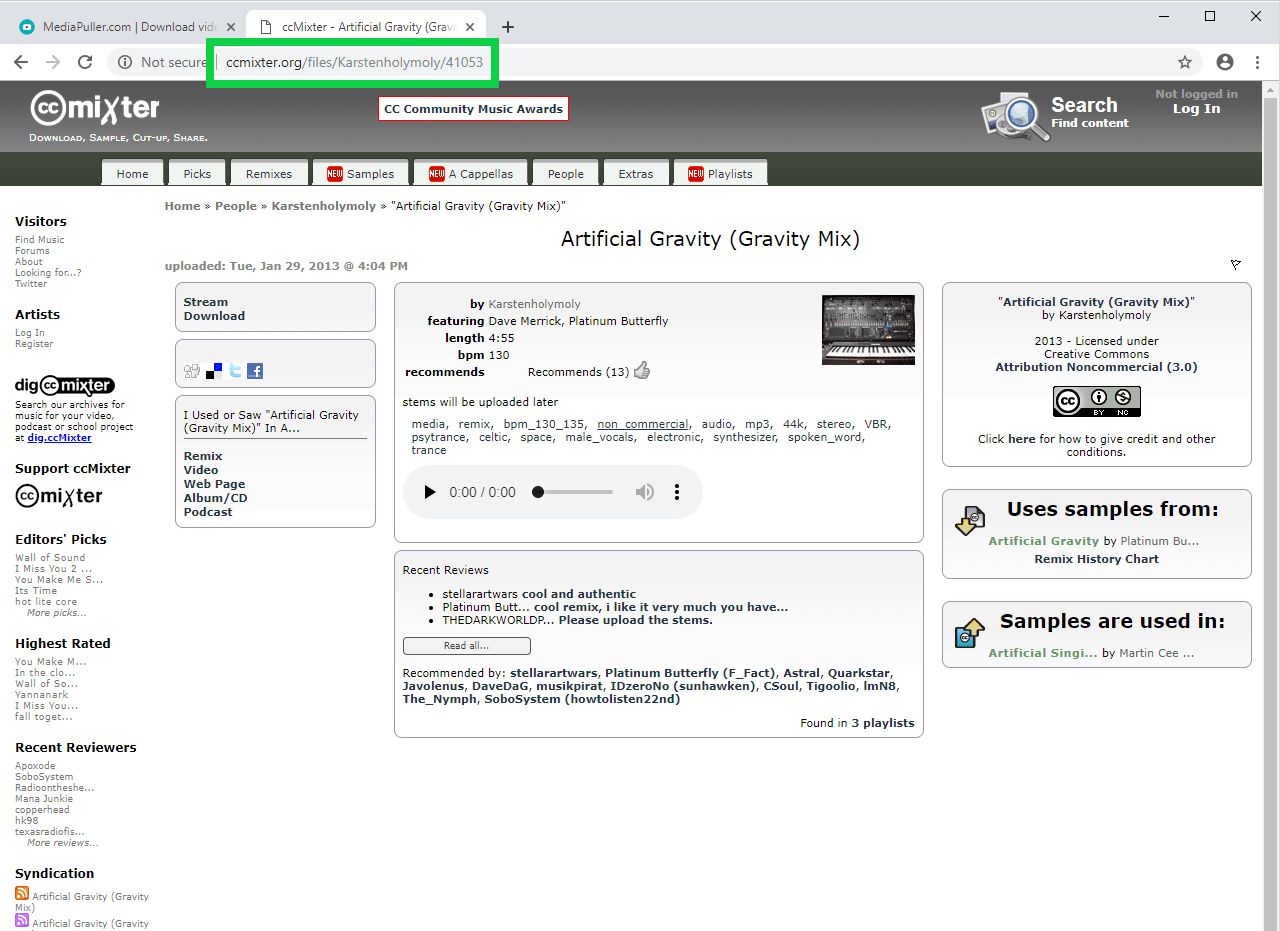
Step 2. Copy the direct ccMixter page URL from your browser address bar.
A direct item page gives MediaPuller a clearer target to process.
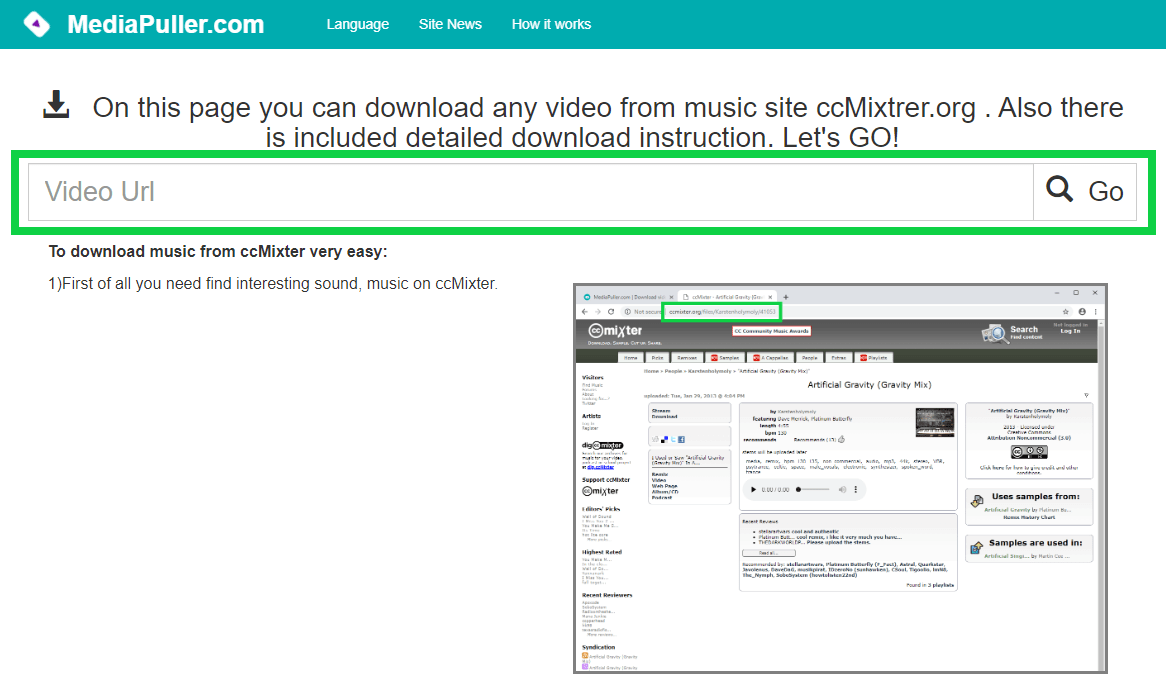
Step 3. Paste the copied ccMixter link into the MediaPuller input field and click Go. The service will check the page and prepare available results when they can be found.
Step 4. Review the returned options.
Depending on the page, you may see one file, several available versions, or no downloadable result.
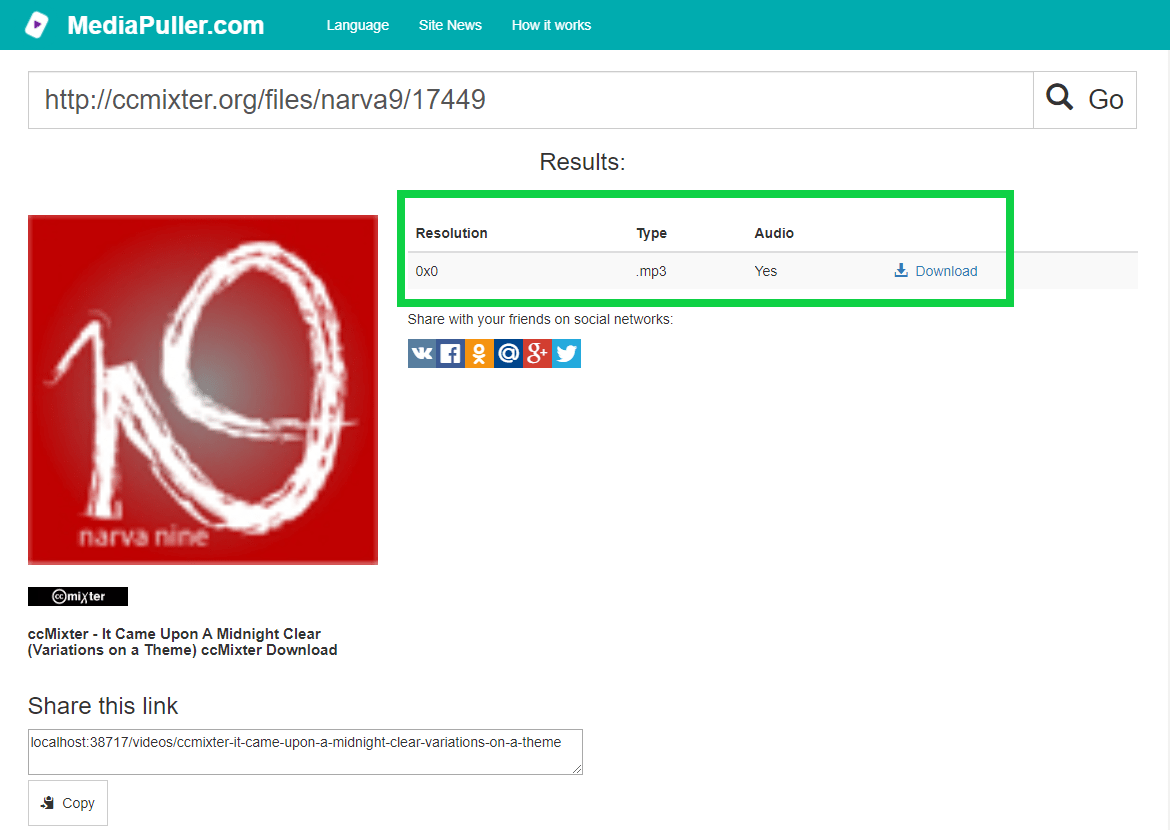
Step 5. Choose the available option that fits your needs and click the download link.
Check the file type and any visible information before saving the file.
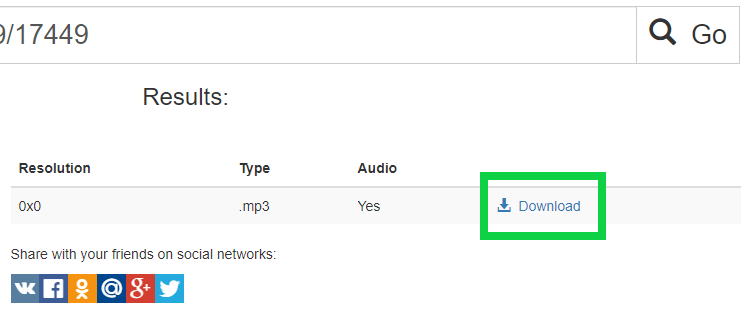
Step 6. Save the file through your browser. If the file opens in the browser instead of downloading immediately, use the browser download icon, save option, or context menu.
ccMixter Music, Remixes, and Downloadable Media
ccMixter is different from many standard video platforms because it is focused on music, remixes, samples, and creator-uploaded audio. That is why ccMixter links should be treated as media pages rather than ordinary video posts.
When you use MediaPuller with ccMixter, it is better to start from the exact track, remix, sample, or upload page. This helps the service process the right item and show available download options when they can be retrieved.
Because of that, this downloader page focuses on direct media pages, file availability, and license awareness. The goal is not just to process a link, but also to remind users that downloaded music may have usage conditions attached to it.
Check the License Before Using ccMixter Content
Many ccMixter uploads may be shared with license information, attribution requirements, or usage notes from the creator. Before using a downloaded file in a video, game, podcast, website, commercial project, or public release, check the license and follow the rules shown on the original ccMixter page.
A file being downloadable does not automatically mean it can be used anywhere without conditions. Some tracks may require attribution, some may have restrictions, and some may only be suitable for certain types of use.
Best Links to Use with MediaPuller
For the best result, use a direct URL to the exact ccMixter item you want to process. A page with one clear track or upload is easier to handle than a page that lists many different items.
If a link does not work, open the item page again, wait until it loads, and copy the URL directly from the browser address bar. Avoid copied links from search results, filtered lists, dynamic pages, or embedded previews when possible.
Possible File Results
The result list depends on what MediaPuller can retrieve from the submitted ccMixter page. Some pages may return an audio file, some may offer different available versions, and some may not return a downloadable file at all.
If several options appear, check the file extension, size, and visible details before downloading. This helps you save the correct file and avoid repeating the same process.
Using ccMixter Downloads for Creative Projects
ccMixter content is often useful for creators who need music, remix material, background audio, or reference tracks. Downloaded files may be helpful for editing, offline listening, project planning, or checking how a track fits your idea.
Always keep the original ccMixter page link or creator information when you plan to use the file in a public project. This makes it easier to verify the license later and provide proper credit when required.
Why a ccMixter Link May Not Work
A ccMixter link may fail if it points to a profile, search page, list page, removed item, unavailable file, unsupported page type, or content that cannot be processed. The page may also return no result if the downloadable file cannot be detected by the service.
If this happens, try another direct ccMixter item URL. You can also copy the link again from the original page and make sure it points to the exact media item, not only to a general section of the site.
Important Note About Rights and Permissions
Make sure you have the right to save, reuse, remix, publish, or redistribute any content you download. Respect creators, license terms, attribution rules, and platform guidelines. Download and use files only when you are authorized to do so or when your use is allowed by applicable law.
ccMixter Downloader FAQ
What type of ccMixter link should I paste?
Use a direct link to the specific ccMixter track, remix, sample, or upload page you want to process. Links to search pages, tag pages, profile pages, or general lists may not return the same result.
Is ccMixter a video hosting platform?
ccMixter is better known for music, audio, samples, and remix-oriented content rather than standard video hosting. That is why this page focuses on downloadable media and audio-style results instead of treating ccMixter like a normal video site.
Can I download every file from ccMixter?
No. MediaPuller can only show download options when the submitted page is available and a downloadable file can be retrieved. Some pages may not return results because of page type, file availability, restrictions, or technical limits.
Why does my ccMixter link return no result?
The link may point to a search page, profile, list, unavailable item, unsupported page type, or a page where the file cannot be detected. Try using a direct item page and copy the full URL from your browser address bar.
Can I use downloaded ccMixter music in my own project?
It depends on the license and usage terms shown on the original ccMixter page. Always check the license, attribution requirements, and allowed use before adding downloaded music to a public or commercial project.
Do I need to credit the creator?
Some ccMixter content may require attribution. Check the original page and license details before publishing or redistributing anything based on the downloaded file.
Can I use MediaPuller on Android or iPhone?
You can open MediaPuller in a mobile browser and paste a ccMixter link. The final saving process depends on your device, browser, operating system, and the file options returned by the service.
Where is the downloaded ccMixter file saved?
The final download location depends on your browser settings. In most cases, the file is saved to the default Downloads folder unless you have manually selected another location.
Does MediaPuller change the original ccMixter file?
No. MediaPuller does not edit, delete, remix, or modify the original ccMixter file. It only processes the submitted link and displays available file options when they can be retrieved.
More Download Tools
MediaPuller also supports other platforms. If you need to save media from another site, you can also try the Instagram Downloader , YouTube Downloader , Vimeo Downloader , Facebook Downloader , DailyMotion Downloader , Aparat Downloader , TikTok Downloader , Coub Downloader , x.com Downloader , Tumblr Downloader , Threads Downloader , Reddit Downloader , Pinterest Downloader , SoundCloud Downloader , Twitch Downloader , Spotify Downloader , Rumble Downloader , Niconico Downloader , Snapchat Downloader , Bluesky Downloader , Kwai Downloader , Flickr Downloader , LinkedIn Downloader , VK Downloader , OK.ru Downloader , Xiaohongshu Downloader and Archive.org Downloader