Download Vimeo Video Online
MediaPuller helps you download available videos from Vimeo using a direct video link. Paste a Vimeo URL into the input field, click Go, and review the file options returned for that specific video.
Vimeo is often used for portfolios, creative projects, presentations, courses, business videos, and embedded media. Because of that, Vimeo links can behave differently from regular social video links. This page explains which URLs work best and what can affect the download result.
Download Vimeo Videos from Direct Video Pages
The best result usually comes from a direct Vimeo video page. A clean URL that points to one exact video is easier to process than a profile page, showcase, album, channel, search page, or embedded player container.
If the video is public and available, MediaPuller can try to analyze the link and show the download options that can be retrieved. The final list may depend on the original upload, privacy settings, owner restrictions, and the formats available for that video.
Vimeo Links Are Often More Restricted
Vimeo creators can control how their videos are shared, embedded, viewed, and downloaded. Some videos may be public, some may be private, some may require a password, and some may only work on selected websites.
Because of these settings, not every Vimeo link will return downloadable files. If a video owner limits access or disables public availability, MediaPuller may not be able to show download options for that link.
How to Use the Vimeo Downloader
Use the exact Vimeo video URL whenever possible. Avoid copying links from search results, creator profiles, collections, or pages where the video is only embedded as part of another layout.
Step 1. Open Vimeo and go to the video page you want to save.
Make sure the page is focused on one specific video, not a profile, showcase, or search result.
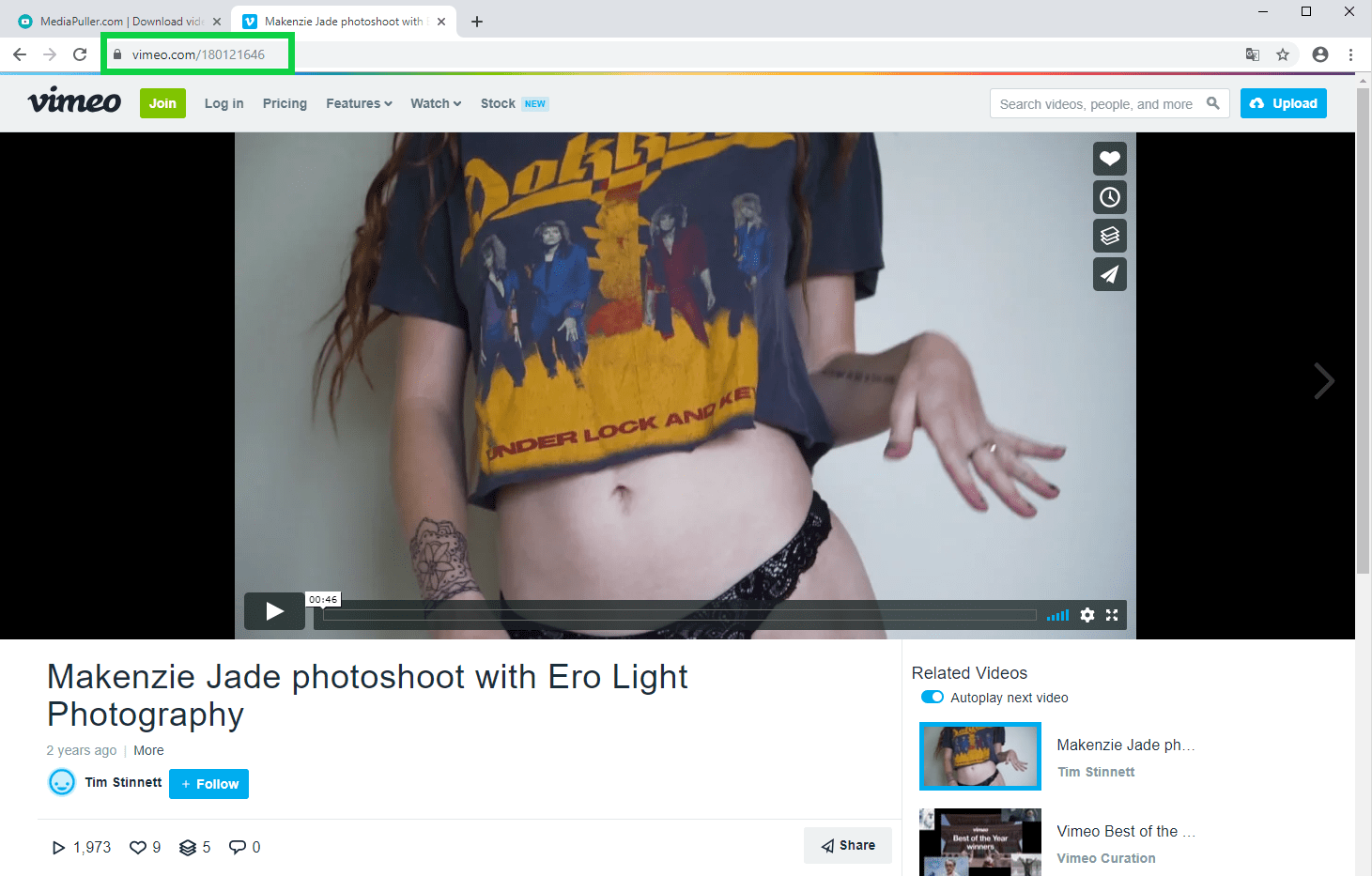
Step 2. Copy the Vimeo video URL from the browser address bar or from the available share option.
A direct video page URL usually gives the cleanest result.
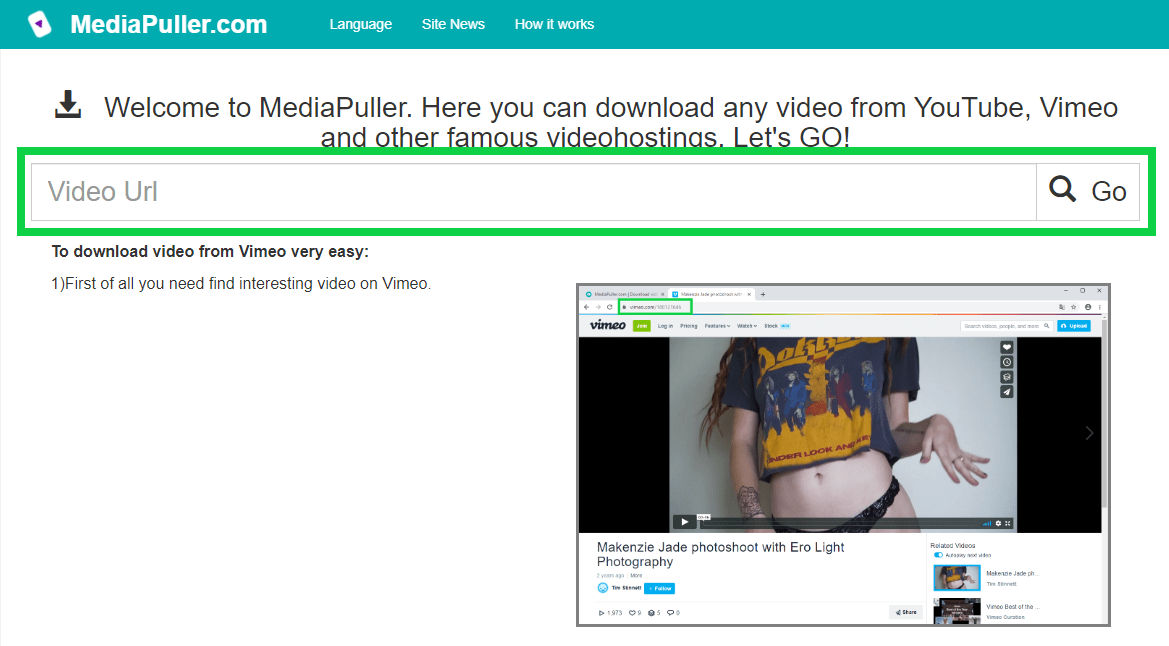
Step 3. Paste the copied Vimeo link into the input field on MediaPuller and click Go. The service will check the submitted URL and prepare the available results.
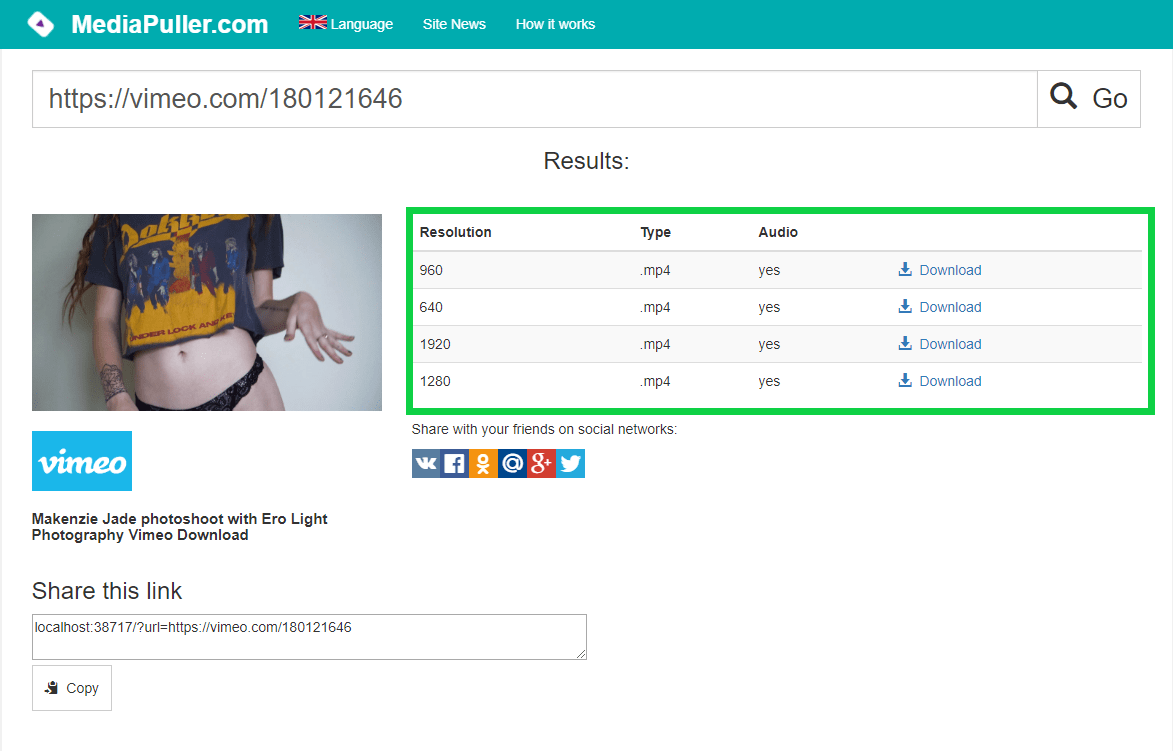
Step 4. Review the returned Vimeo download options.
Depending on the video, you may see different file versions, qualities, or formats.
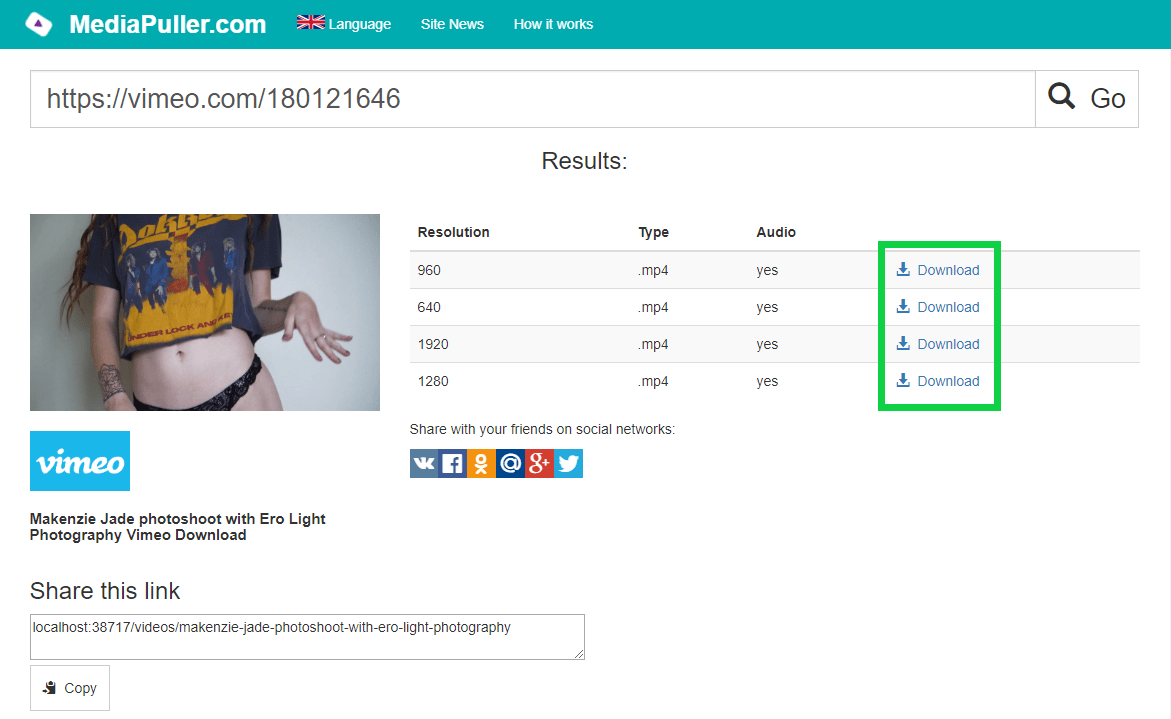
Step 5. Choose the option that fits your device and click the download link.
A smaller file may be better for quick saving, while a higher-quality option may be better for presentations or large screens.
Step 6. Save the file through your browser. If the video opens in a built-in browser player, use the download icon, context menu, or save option to store it on your device.
Public Vimeo Pages vs Embedded Vimeo Players
Vimeo videos are often embedded on other websites. An embedded player link may look different from a normal Vimeo video page and may include extra parameters or website-specific restrictions.
If an embedded Vimeo link does not work, try opening the video directly on Vimeo and copying the main video page URL. A direct Vimeo page is usually easier to process than a player URL copied from another website.
When a Vimeo Download Tool Is Useful
A Vimeo downloader can be useful when you need to keep a video for offline viewing, save a presentation, review a creative project, study a lesson, or keep a reference file on your device.
Vimeo content is often longer, more polished, or more professional than short social clips. That is why checking the available quality and file size before saving is especially important.
Available Vimeo Video Quality
Vimeo videos may have different available quality levels depending on the original upload and video settings. Some videos may return several versions, while others may show only one available file or no downloadable result.
If you need a file for quick viewing, a lower-quality option may be enough. If you need better visual clarity for a screen, class, client review, or presentation, choose a higher available quality when it appears in the results.
Why a Vimeo Link May Not Work
A Vimeo URL may fail if the video is private, password-protected, restricted by the owner, removed, embedded-only, unavailable in your region, or copied incorrectly. Links to profiles, showcases, channels, or search pages may also fail because they do not point to one exact video file.
If this happens, open the video in a normal browser tab, wait until the page loads, and copy the URL again. You can also test another public Vimeo video link to check whether the issue is related to one specific video or to the copied URL.
Using Vimeo Downloader on Desktop and Mobile
You can use MediaPuller from a desktop or mobile browser. On Windows, macOS, Android, or iPhone, the basic workflow is the same: copy the Vimeo video URL, paste it into the downloader, click Go, and check the available results.
The final saving behavior depends on your browser and device. Some browsers download the file immediately, while others open the video first and require you to save it manually.
Important Note About Vimeo Rights and Permissions
Make sure you have the right to save or use the Vimeo content you download. Respect creators, copyright owners, businesses, educators, and platform rules. Download videos only when you are authorized to do so or when your use is allowed by applicable law.
Vimeo Video Downloader FAQ
What Vimeo link should I paste?
Use a direct link to a specific Vimeo video page. Links to profiles, showcases, albums, channels, search pages, or embedded containers may not provide the same result.
Can I download private Vimeo videos?
Private, password-protected, restricted, or unavailable Vimeo videos may not return download options. MediaPuller can only show results when the video is available and the link can be processed.
Can I use a Vimeo embed link?
You can try using an embed link, but a regular Vimeo video page URL is usually better. If the embed link does not work, open the video directly on Vimeo and copy the main video URL.
Why does my Vimeo URL return no result?
The URL may point to a non-video page, the video may be private or restricted, or the link may include extra parameters. Try copying the clean URL from the original Vimeo video page.
Can I download Vimeo videos on Android?
Yes, you can use MediaPuller from an Android browser. The final saving process depends on your browser, device settings, and the available file options returned for the Vimeo video.
Can I download Vimeo videos on iPhone?
You can use MediaPuller in a browser on iPhone. File saving behavior may depend on iOS, your browser, and the file type returned after processing the Vimeo link.
Why is the quality I want not available?
Available quality depends on the original Vimeo upload, video settings, and the files returned after processing the link. If a certain resolution is not shown, it may not be available for that video through the current result list.
Does MediaPuller modify the original Vimeo video?
No. MediaPuller does not edit, delete, or change the original Vimeo video. It only processes the submitted link and displays available file options when they can be retrieved.
More Video Download Tools
MediaPuller also supports other video platforms. If you need to save a video from another site, you can also try the Instagram Downloader , YouTube Downloader , Facebook Downloader , DailyMotion Downloader , Aparat Downloader , ccMixter Downloader , TikTok Downloader , Coub Downloader , x.com Downloader , Tumblr Downloader , Threads Downloader , Reddit Downloader , Pinterest Downloader , SoundCloud Downloader , Twitch Downloader , Spotify Downloader , Rumble Downloader , Niconico Downloader , Snapchat Downloader , Bluesky Downloader , Kwai Downloader , Flickr Downloader , LinkedIn Downloader , VK Downloader , OK.ru Downloader , Xiaohongshu Downloader and Archive.org Downloader