Download x.com Video Online
MediaPuller helps you save available videos from X.com, formerly known as Twitter, directly through your browser. Paste a link to a public X post with video, click Go, and check the download options returned for that post.
This page is built for video posts, not for general profiles, search feeds, trends, or timelines. For the best result, use the direct post URL that contains the video you want to save.
Download Videos from X.com Posts
X is different from classic video hosting sites because videos are usually attached to posts, replies, reposts, or quoted posts. That means the most important thing is to copy the correct post link, not just a profile link or a feed URL.
MediaPuller works best when the submitted URL points to one specific public post. Links from both x.com and older twitter.com URLs may point to the same type of post, but the video still needs to be available and accessible for processing.
How to Save a Video from X or Twitter
The process is simple, but the link matters. Make sure you open the post that actually contains the video before copying the URL.
Step 1. Open X.com or Twitter and find the post with the video you want to save.
Avoid copying links from the home feed, search results, hashtags, or profile pages.
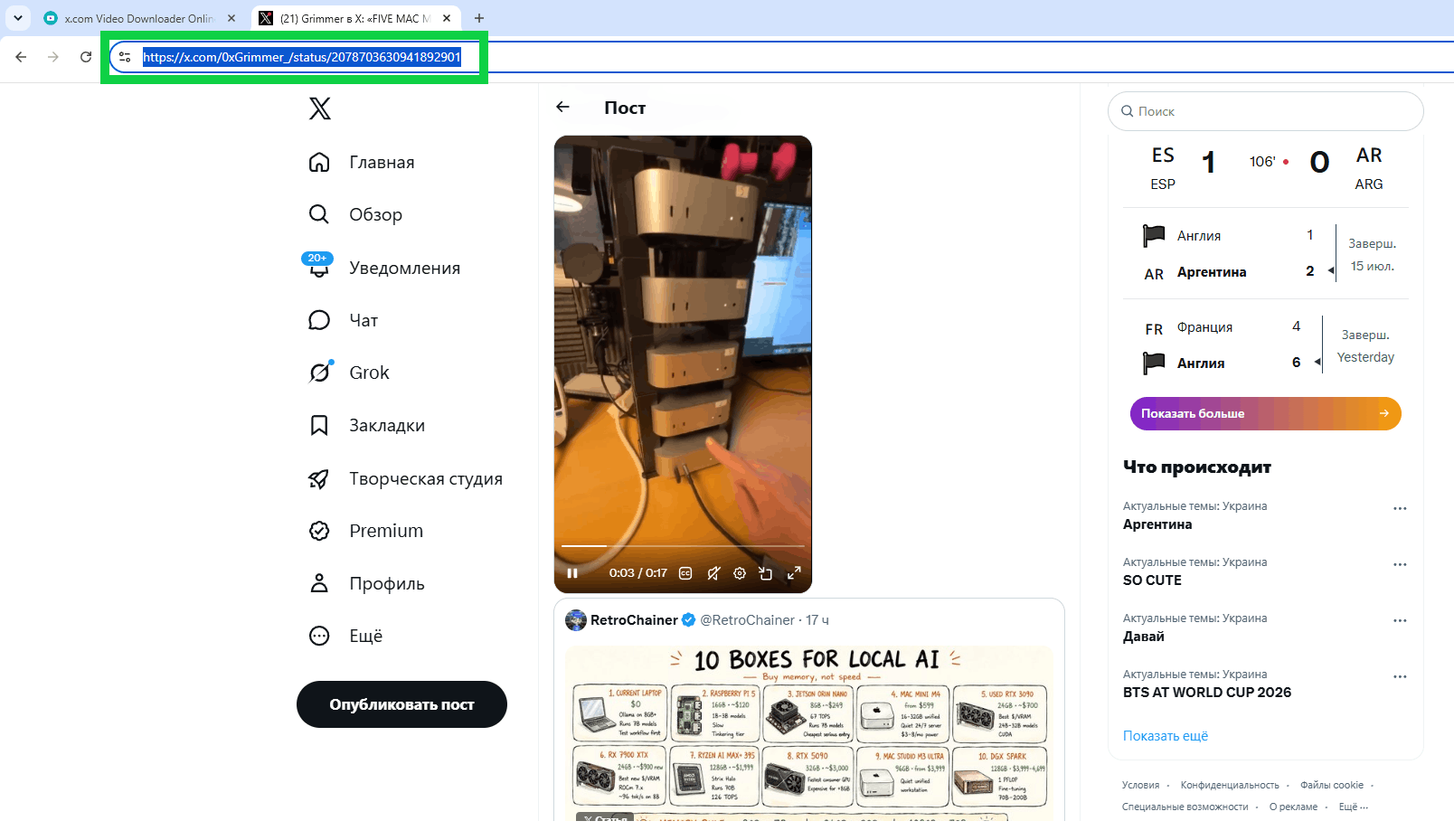
Step 2. Copy the direct post URL from the browser address bar or from the share option.
A good link usually points to one exact post rather than to a user profile or timeline.
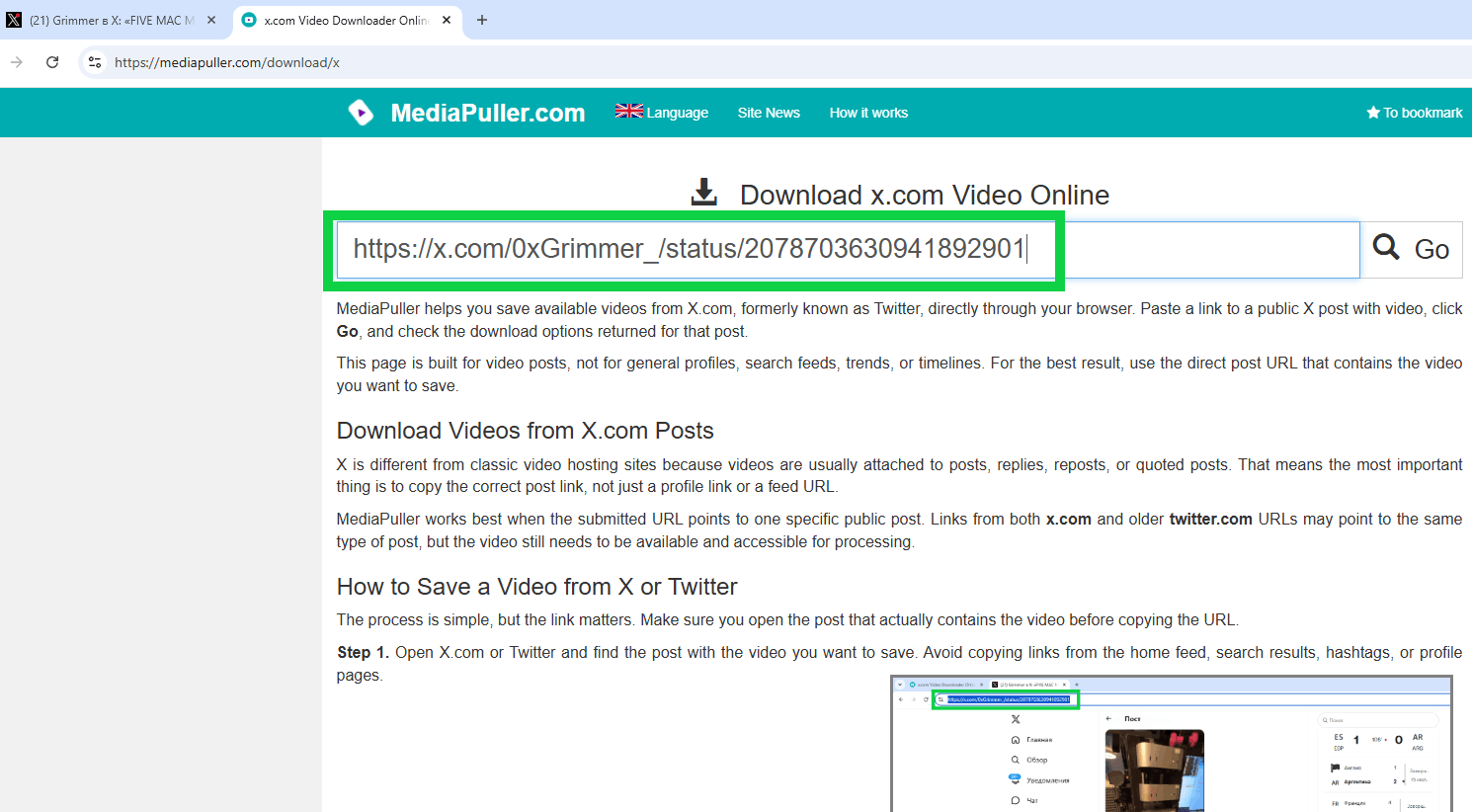
Step 3. Paste the copied X or Twitter link into the MediaPuller input field and click Go. The service will check the post and look for available video download options.
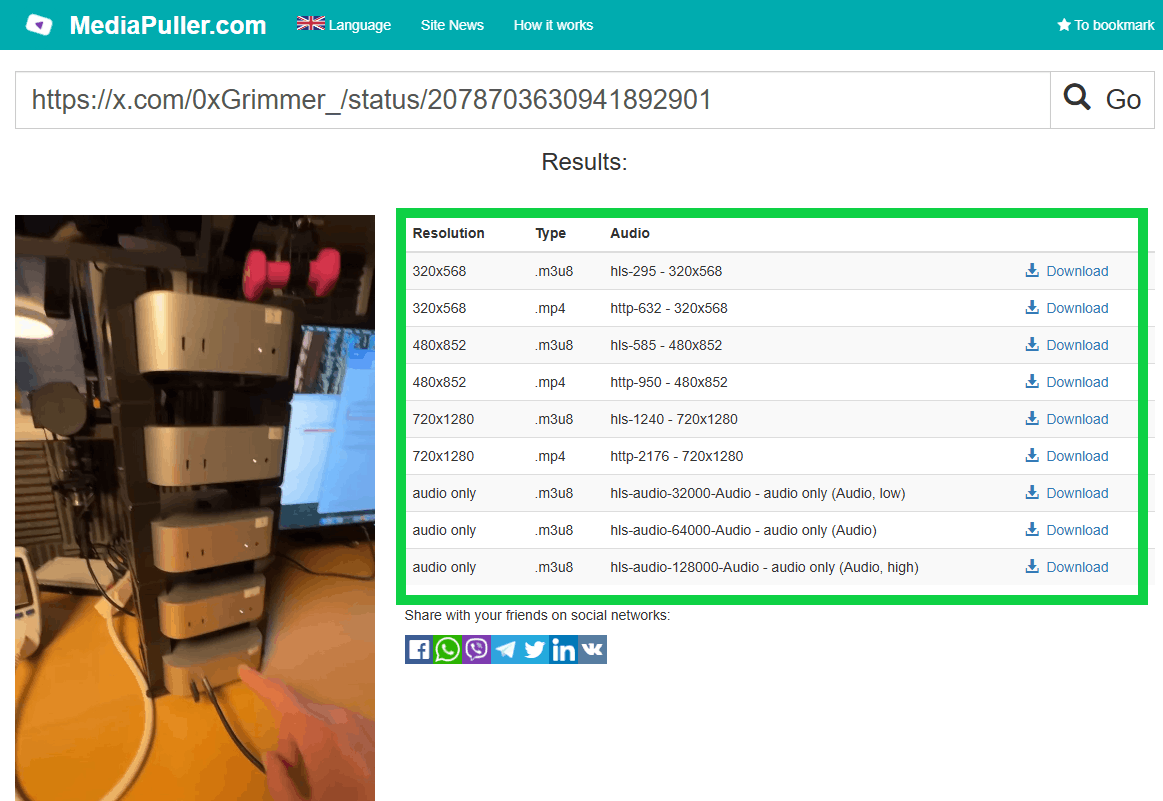
Step 4. Review the result list.
If the post can be processed, MediaPuller may show available video versions, file types, or quality options.
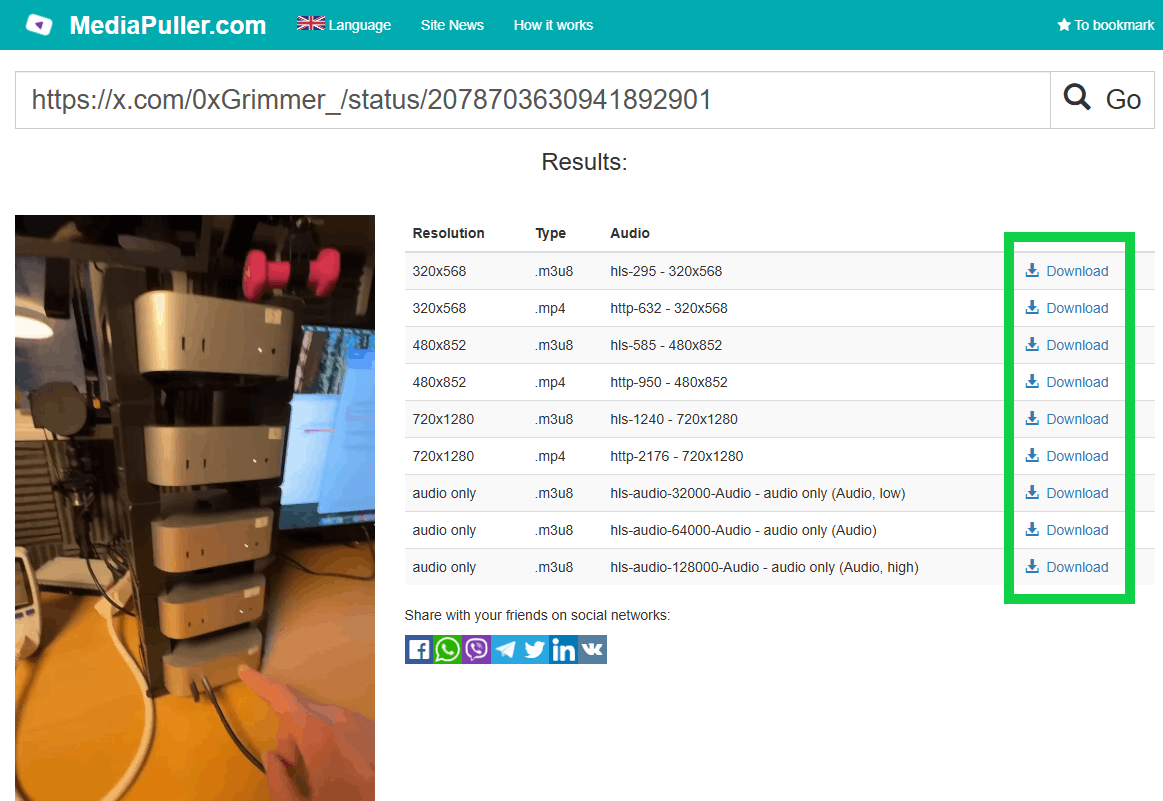
Step 5. Choose the option that fits your device and click the download link.
For quick sharing or mobile storage, a smaller file may be better. For larger screens, choose a higher available quality when it appears.
Step 6. Save the file through your browser. If the video opens in a browser player instead of downloading right away, use the browser download icon, save option, or context menu.
X.com Links vs Twitter.com Links
Many users still share older Twitter links, while others use newer X.com links. In many cases, both formats can lead to the same post, but the downloader still needs a direct URL to the post that contains the video.
If one version of the link does not work, open the post in your browser and copy the URL again after the page fully loads. Avoid shortened, redirected, or incomplete links when possible.
Posts, Reposts, Replies, and Quoted Videos
Video posts on X can appear in different places: original posts, replies, reposts, or quoted posts. If a video appears inside a quoted post, the best link is usually the link to the original post that contains the media.
A timeline or profile may show many videos, but MediaPuller needs one exact post to process. When in doubt, open the video post separately and copy that page URL.
What Video Options Can Appear?
The available options depend on the original media attached to the X post and what can be retrieved after the link is processed. Some posts may return one video file, some may show several quality options, and some may return no downloadable result.
Before saving, check the visible file details if they are shown. This helps you avoid downloading the wrong version, especially when a post contains more than one media item.
Using the X Video Downloader on Mobile
You can use MediaPuller from a mobile browser on Android or iPhone. Copy the X post link, paste it into the downloader, and check the returned result list.
Mobile browsers handle files differently. Some save the video directly, while others open it first and require you to use the share menu, download icon, or save option.
Why an X Video Link May Not Work
An X or Twitter link may fail if the post is private, deleted, restricted, copied incorrectly, temporarily unavailable, or not pointing directly to a video post. Links to profiles, feeds, search pages, hashtags, or trends usually do not provide a clean video target.
If the link does not return results, open the post again, copy the full URL from the address bar, and try once more. You can also test another public video post to see whether the issue is related to one specific post.
Important Note About Rights and Permissions
Make sure you have the right to save or use the content you download. Respect creators, copyright owners, and platform rules. Download videos only when you are authorized to do so or when your use is allowed by applicable law.
X Video Downloader FAQ
What type of X link should I paste?
Paste a direct link to a public X post that contains a video. Links to profiles, search pages, hashtags, trends, or timelines may not return the same result because they do not point to one exact video post.
Can I use old Twitter.com links?
Yes, you can try using older Twitter.com post links if they point to a public post with video. If the link redirects to X.com and the post can be processed, MediaPuller may show available download options.
Can I download videos from private X accounts?
No. MediaPuller is intended for available public posts that can be accessed and processed. Private, protected, removed, or restricted posts may not return download options.
Why does my X video link return no result?
The link may point to a profile, feed, repost, search page, or a post without accessible video. It may also fail if the post was deleted, restricted, private, temporarily unavailable, or copied incorrectly.
Can I download videos from quoted posts?
If the video belongs to a quoted post, open the original post that contains the video and copy that direct URL. This gives MediaPuller a clearer target than copying only the outer quote post.
Can I download GIFs from X?
Some animated media on X may behave like video files, but availability depends on how the media is stored and returned after processing. If the link can be processed, MediaPuller will show the available options.
Can I download X videos on Android?
Yes, you can use MediaPuller in an Android browser. The final saving process depends on your browser, device settings, and the file option returned for the X post.
Can I download X videos on iPhone?
You can use MediaPuller in a mobile browser on iPhone. The save behavior may depend on iOS, your browser, and the type of video file returned after processing the link.
Why does the X video open instead of downloading?
Some browsers open video files in a built-in player first. If this happens, use the browser download icon, context menu, share menu, or save option to store the file on your device.
Does MediaPuller change the original X post?
No. MediaPuller does not edit, delete, repost, like, or modify the original X post. It only processes the submitted link and displays available file options when they can be retrieved.
More Video Download Tools
MediaPuller also supports other video platforms. If you need to save a video from another site, you can also try the Instagram Downloader , YouTube Downloader , Vimeo Downloader , Facebook Downloader , DailyMotion Downloader , Aparat Downloader , ccMixter Downloader , TikTok Downloader , Coub Downloader , Tumblr Downloader , Threads Downloader , Reddit Downloader , Pinterest Downloader , SoundCloud Downloader , Twitch Downloader , Spotify Downloader , Rumble Downloader , Niconico Downloader , Snapchat Downloader , Bluesky Downloader , Kwai Downloader , Flickr Downloader , LinkedIn Downloader , VK Downloader , OK.ru Downloader , Xiaohongshu Downloader and Archive.org Downloader